Studio Radoni

Less time wasted on documents and repeat requests — AI that actually works in your business

We help you reply to customers faster, use your documents and price lists without hunting for them by hand, and automate repetitive work — with solutions already proven in production, not just demos.

For whom

  • SMEs that want fewer hours on email, paperwork and repeat requests — useful AI, not demos Mechanical · Healthcare · Logistics · Education · Manufacturing · Services
  • Professional firms that need answers from case files and regulations right away Legal · Notarial · Accounting · Labour consultants
  • Document-centric organizations whose archives and procedures should answer — not sit in folders Quality · Compliance · HR · Customer care

Results

What matters in production

  • 0x

    More productivity

  • −0%

    Lower operating costs

  • 0+

    Clients already served

What you get

Five concrete ways to make your business work better

You do not need to be technical: here is what changes in practice — and, if you care, what we call it. Capabilities already proven on real platforms, adapted to your context.

01 — Assistants (agents)

An assistant that replies for you — and calls you when needed

We design assistants on your site or internal channels — like the chatbot already in production on TuaGPT — that handle typical requests (hours, quotes, job status) and, when needed, break a goal into steps and recalibrate the plan.

What you get: an assistant that handles typical requests and hands off to you when a person is needed.

  • Web or internal assistants with context and human handoff
  • When needed: multi-step plans, clear state and controlled replanning (agents)
  • Safety rules: time limits, human escalation, a trail of what the AI did

As in TuaGPT: from the on-site chatbot to flows that work beyond chat alone.

Autonomous agent: planning cycle Plan Act Check Replan

02 — Smart documents (RAG)

Answers from your manuals, price lists and files — not guesses

It is not enough to “plug AI into your files”: we organise how your documents are read, searched and used in answers, aligned with how you work (a RAG system).

What you get: answers taken from your materials, with references to where they are written — not domain chatter.

  • Ingest and search tuned to your archive (manuals, price lists, case files)
  • Separate indexes for business lines or sites, when needed
  • Citations and quality checks: fewer made-up answers, more verifiable trails

As in TuaGPT: company knowledge you can retrieve, not just “remembered” by heart.

RAG system: documents, index and answer Index Answer + cites

03 — AI instructions (prompts)

AI that always does the same things the way you decided

We design AI instructions as clear work contracts — not free text left to chance: sections, rules, examples and typed variables (e.g. {ClientName}) resolved repeatably. It is the same discipline put into practice in TuaGPT with the .prompt format.

What you get: clear, repeatable, auditable behaviour — not handmade prompts that change every time.

  • Instruction contract: context, operations, rules, examples and output constraints
  • Typed variables (text, number, date, choice…) and flows that persist in the conversation
  • Sector catalogues and reusable system instructions, with ownership and releases
  • When needed, we clean up and standardise what you already use today

As in TuaGPT — public specification: tuagpt-prompt-format

Prompt TuaGPT: formato .prompt XML con variabili template.prompt <prompt version="1.0"> <metadata>…</metadata> <content> introduction · context operations · rules {ClientName} {ReleaseVersion} </content> Variable Wizard types · required · regex chat workflow Catalogs PromptCollection SystemPrompt · FN import / export

04 — Forecasts and classification (ML)

When chat is not enough: numbers, patterns and data-driven decisions

If the problem is forecasting, classifying or flagging anomalies — not just answering a question — we design machine learning pipelines integrated into your day-to-day work.

What you get: forecasts or classifications on your real data, checked before you use them in the business.

  • Data prepared properly so the model does not “learn at random”
  • Training, testing and monitoring: you know if it still works over time
  • Deployment linked to existing processes (API, batch or on-site)

Where GenAI chat alone is not enough.

Machine learning: data, training, eval and deploy Data features Train model Eval Deploy ML pipeline: from data to production service

05 — Connections (integration)

AI linked to ERP, mail or site — no copy-paste

Value appears when AI talks to your systems: customers, orders, tickets, channels and site. Here comes the secure bridge between AI and applications (as in TuaGate / TuaMCP).

What you get: AI connected to the software you already use — no retyping between windows.

  • Links to existing systems and modern channels
  • Assistants connected to knowledge bases, tickets and applications
  • Controlled access, usage limits and end-to-end visibility
  • From prototype to a stable service your team can use

As in TuaMCP: the bridge that connects TuaGPT to external applications.

Integration: TuaMCP between AI and external applications TuaGPT TuaMCP tools context connectors CRM ERP API / App

Concrete proof

Built in production

TuaGPT, TuaGate and the satellites are not slides: they are real systems where these capabilities already work — assistants, answers from documents, links to your software.

Illustration of the TuaGPT conversational and agentic platform

TuaGPT

Platform for assistants and answers from documents: production instructions and autonomous flows for real business scenarios.

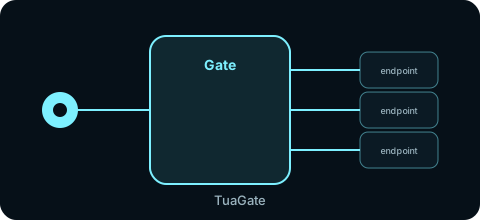
Illustration of the TuaGate gateway and integration layer

TuaGate

The gate between AI and business systems: controlled access and the foundation to connect satellite services.

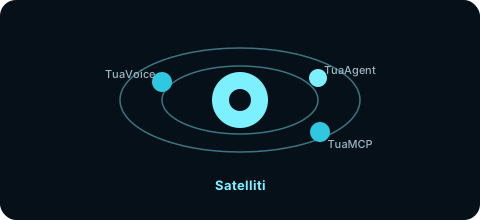
Illustration of TuaVoice, TuaAgent and TuaMCP satellites

Satellites

Practical extensions: TuaVoice (voice), TuaAgent (automation) and TuaMCP (link to external tools).

www.tuagpt.com

Method

From need to stable service

  1. 01

    Understand

    Goals, data, constraints and risks: what is worth automating and what is not.

  2. 02

    Design

    How the assistant, document answers and connections will work — and how you measure success.

  3. 03

    Build

    Step-by-step implementation with tests, checks and integration into real processes.

  4. 04

    Hand over

    Rules, operating notes and handover: AI your team can keep running.

Have a process to streamline or too many repeat requests?

One call is enough to see whether an assistant, answers from documents, forecasts or a link to your systems is the right lever.

Contact

Let's talk

Write, call or book a slot. Direct reply, no useless funnels.

Quick message

By submitting you accept the Privacy Policy.